 Ask AI
Cloudinary Moderation
Last updated: Oct-07-2026
Overview
Cloudinary Moderation uses AI tailored to your visual guidelines to validate images and videos for brand consistency, quality, and compliance. It functions like a dedicated brand reviewer, ensuring every asset meets your standards before it goes live. By automating what used to be a time-consuming manual task, it creates a scalable, reliable guardrail for teams handling high-volume content across marketing, marketplaces, and UGC flows.
Supported media types
Cloudinary Moderation works on both images and videos. The AI evaluates images at the pixel level and videos across their frames, on-screen text, and audio track to enforce your brand, quality, safety, and compliance standards.
Key use cases
1. Scaling vendor or partner submissions
Marketplaces and platforms that receive assets from vendors, partners, or external contributors often need to validate large volumes of assets. Manual review does not scale and leads to inconsistent quality.
Cloudinary Moderation automatically validates assets as they enter your pipeline.
Common checks include:
- Background requirements, like white background
- Product placement and coverage
- Image quality and resolution
- Centered subjects
- Consistent lighting and composition
- Detection of watermarks or promotional badges
- Blocking screenshots
- Confirming the listed product appears in the image or video
- Flagging unwanted on-screen text or spoken claims in videos
- Duplicate detection
- Detection of AI-generated or web-sourced assets
Automated moderation ensures consistent visual standards across listings while reducing operational overhead.

2. Launching user-generated content (UGC)
When enabling user uploads, organizations cannot predict what type of content users may submit. Without moderation, inappropriate or unsafe content may appear publicly.
Cloudinary Moderation reviews user-submitted images and videos before they are published.
The system can:
- Detect unsafe or inappropriate content
- Filter low-quality assets
- Identify AI-generated content
- Detect stock images
High-quality content can also be automatically approved, enabling teams to safely activate UGC across marketing channels.

3. Enforcing brand guidelines
Organizations often define visual guidelines that must be followed across campaigns and assets. When content is created by multiple teams or agencies, enforcing these rules manually becomes difficult.
Cloudinary Moderation can automatically validate visual requirements such as:
- Logo placement
- Minimum spacing around brand elements
- Composition and framing
- Consistent tone or visual style
- Background or layout requirements
This helps maintain consistent brand presentation across large volumes of assets.

4. Compliance and risk prevention
Images can expose organizations to legal or reputational risk if they are used without proper authorization or violate internal policies.
Cloudinary Moderation helps identify potential compliance risks before assets are published.
Examples include:
- Unlicensed images downloaded from the web
- Unauthorized third-party logos or marks
- AI-generated content
- Sensitive or unsafe visual elements
Moderation can also be used to audit existing assets and identify potential risks across your media library.

About Cloudinary Moderation
Every image and video shapes how customers see your brand. Cloudinary Moderation is an AI-powered review layer that automatically checks your visuals against your brand guidelines, flagging anything that looks off so your team can approve what goes live. AI does the first pass; humans always make the final call.
How it works
 Combines AI and machine learning analysis with custom brand rules
 Identifies low-quality or off-brand images and videos
 Flags or automatically rejects assets based on thresholds you define
 Gives you clear, explainable results and manual override controls
 Learns from feedback to improve moderation accuracy over time
Try a demo
Use this interactive demo to get a feel for Cloudinary Moderation.
Example checks
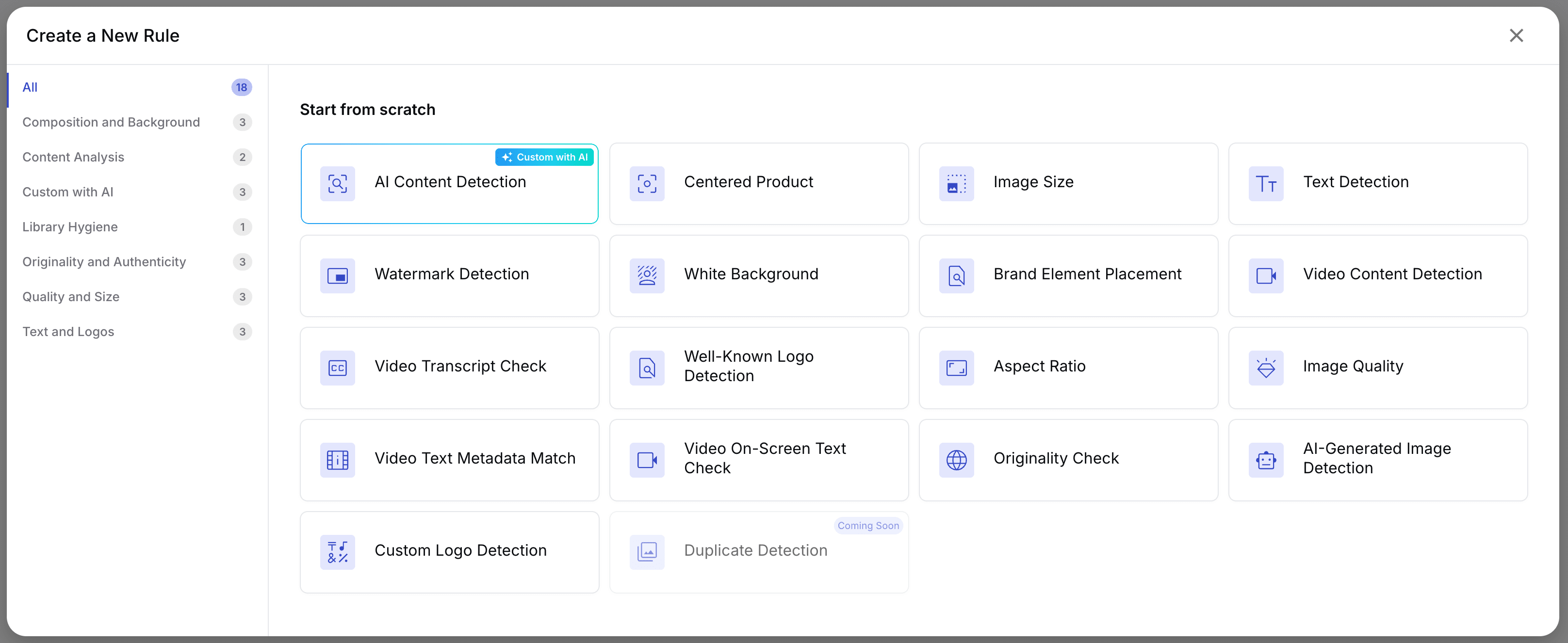
Cloudinary Moderation supports built-in checks and flexible custom rules so you can match your needs to support different use cases.
 |
Quality & composition Blurry or low-res images, incorrect framing or centering, bad crops, off-angle shots, duplicates or near-duplicates. |
 |
Tone & style Incorrect lighting or exposure, harsh filters, off-brand visual treatment. |
 |
Brand consistency Unauthorized logos, overlays or promotional badges, watermarks, incorrect backgrounds, missing logo spacing. |
 |
Legal & safety Unlicensed or web-sourced imagery, AI-generated content, sensitive or unsafe visuals, identifiable people where not allowed. |
 |
Video checks Frame-level content analysis, on-screen text detection, audio track review, and metadata-based checks across the full video. |
Get started
-
Access Moderation
Sign up or log into the Cloudinary Console. From the navigation panel, open Moderation. -
Set up your rules
Start quickly with pre-defined rules that cover common quality, brand, and compliance checks. Add custom rules to reflect your specific brand guidelines as needed. -
Run moderation
Two types of moderation are supported:
One-time moderation
Select existing assets from your Media Library, choose the applicable rules, and run moderation as a single evaluation on the selected content. This mode is intended for backfill scenarios or for testing rule configurations.
Ongoing moderation
Define moderation rules once and apply them automatically on upload or other event triggers. New images and videos are evaluated immediately when they are uploaded. Moderation can also be run on existing assets to evaluate them against the same rules.
In both modes, assets are evaluated against the selected rules and surfaced for action based on the moderation outcome. -
Review results and take action
Focus on assets marked for review, where human validation is needed. See which rules were triggered, inspect confidence levels, and override decisions when necessary. All actions are recorded to provide a full audit trail. -
Use moderation outcomes downstream
Moderation results can be stored as asset metadata and accessed through the Cloudinary API or Console. Use this metadata to trigger workflows such as notifications, routing, or automated fixes using transformations.

Free plan availability
Cloudinary Moderation includes a free plan that allows you to evaluate moderation capabilities before moving to a larger deployment.
The free plan includes 500 moderation actions.
A moderation action is calculated as:
Number of assets moderated × Number of moderation rules applied
For example, if you moderate 100 assets and apply 3 rules to each asset, this counts as 300 moderation actions.
The free plan allows you to test moderation outcomes and evaluate how different rules perform on your assets.
Advanced moderation capabilities
Some capabilities are available only on advanced plans, including: ongoing moderation, AI-generated detection, and web-sourced image detection.
If you would like to explore these capabilities or evaluate how moderation can work best for you, you can contact us for a demo or discuss advanced plans with our team.
For full setup instructions and best practices, see the full Cloudinary Moderation documentation.
Error
Rate this page:
