 Ask AI
Cloudinary MediaFlows Release Notes: June 30, 2026
Last updated: Jun-30-2026
This page lists features and updates shipped during the several weeks prior to the date shown above. The information is accurate as of that date only and intentionally isn't updated when those features change later.
Don't rely on this page to understand how a feature works today. Apart from historical release notes pages, every page in this docs site is kept current, so wherever this page and the current documentation disagree, the current documentation is correct. You can follow the relevant Learn more link from this page to get the latest information on that feature.
New Features
Flow notifications
You can now configure flows to send notifications when an execution succeeds or fails, without adding a Notification block to your flow.
The previous Error Notification settings are now in the new Flow Notifications dialog, which you can open from the Flow Notifications icon in the left panel of the canvas.
You can configure four independent notification channels:
- MediaFlows notifications: Notify selected users or groups. Notifications appear on the Notifications page.
- Webhook notification: Send an HTTP notification to a specified endpoint URL.
- Slack notification: Post to a Slack channel using a connected Slack account.
- Teams notification: Post to a Microsoft Teams channel using a connected Teams account.
Each channel can be independently enabled and set to notify on failure, success, or both. Slack and Teams notifications use a fixed, system-generated message format containing the flow name, status, timestamp, and a link to the execution logs.
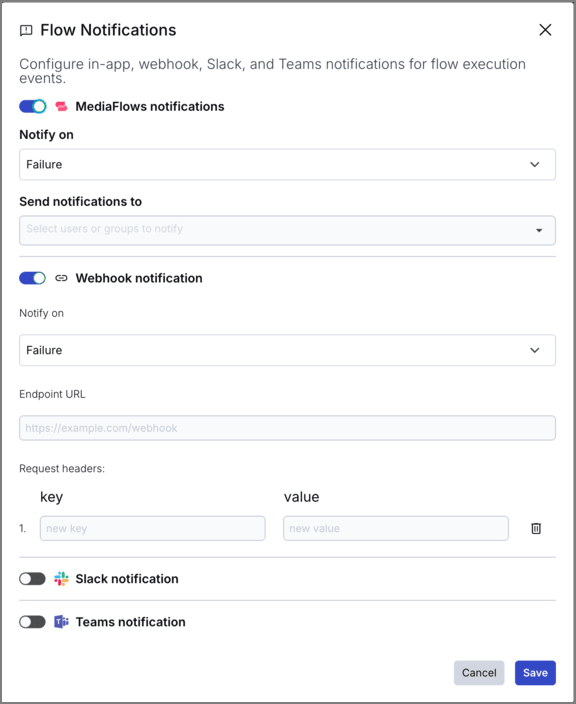 MediaFlows and Webhook
notifications
 Slack and Teams
notifications
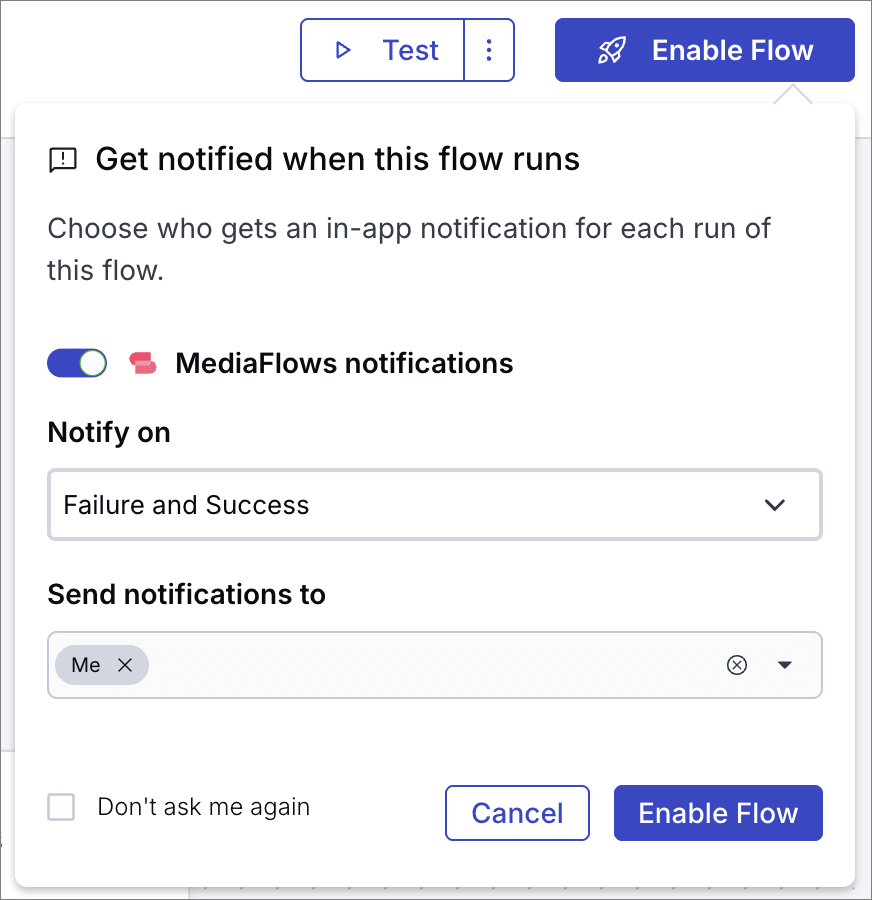
You can also set up in-app notifications when enabling a flow.
Learn about flow notifications | Learn about the Notifications page
Enhancements
New Gemini model options
The Gemini Analyze Image By Prompt block now supports Gemini 3.1 Pro Preview (gemini-3.1-pro-preview) as a model option, and it's now the default model.
Learn about the Gemini Analyze Image By Prompt block
The Gemini Generate Image And Cloudinary Upload block now supports Gemini 3 Pro Image (gemini-3-pro-image) and Gemini 3.1 Flash Image (gemini-3.1-flash-image) as model options. Gemini 3 Pro Image is now the default model.
Learn about the Gemini Generate Image And Cloudinary Upload block
Documentation
Download transcript button for video tutorials
Documentation pages with video tutorials now include a Download Transcript button below the video player. Select it to download the video transcript as a VTT file, which you can use with screen readers, translation tools, or any VTT-compatible application.
Check out all the MediaFlows video tutorials
Register for notifications
Make sure you always know when we publish new release notes with the MediaFlows release notes RSS feed:
 Grab this RSS link to watch for new MediaFlows release notes in your favorite RSS reader.
Error
Rate this page:
